Other / How to Use the beta Branch
How to Use the beta Branch
Starting in June 2026, ANTHEM#9 updates are released through the Steam beta branch.
The beta branch may include work-in-progress content and can be less stable than the default public version. If you notice progression blockers, display issues, or other problems, please let us know in the Steam Community bug reports or feedback discussions.
Switch to the beta Branch
- Open your Steam Library.
- Right-click
ANTHEM#9. - Open
Properties. - Open
Game Versions & Betas. - Select
betafrom the list.
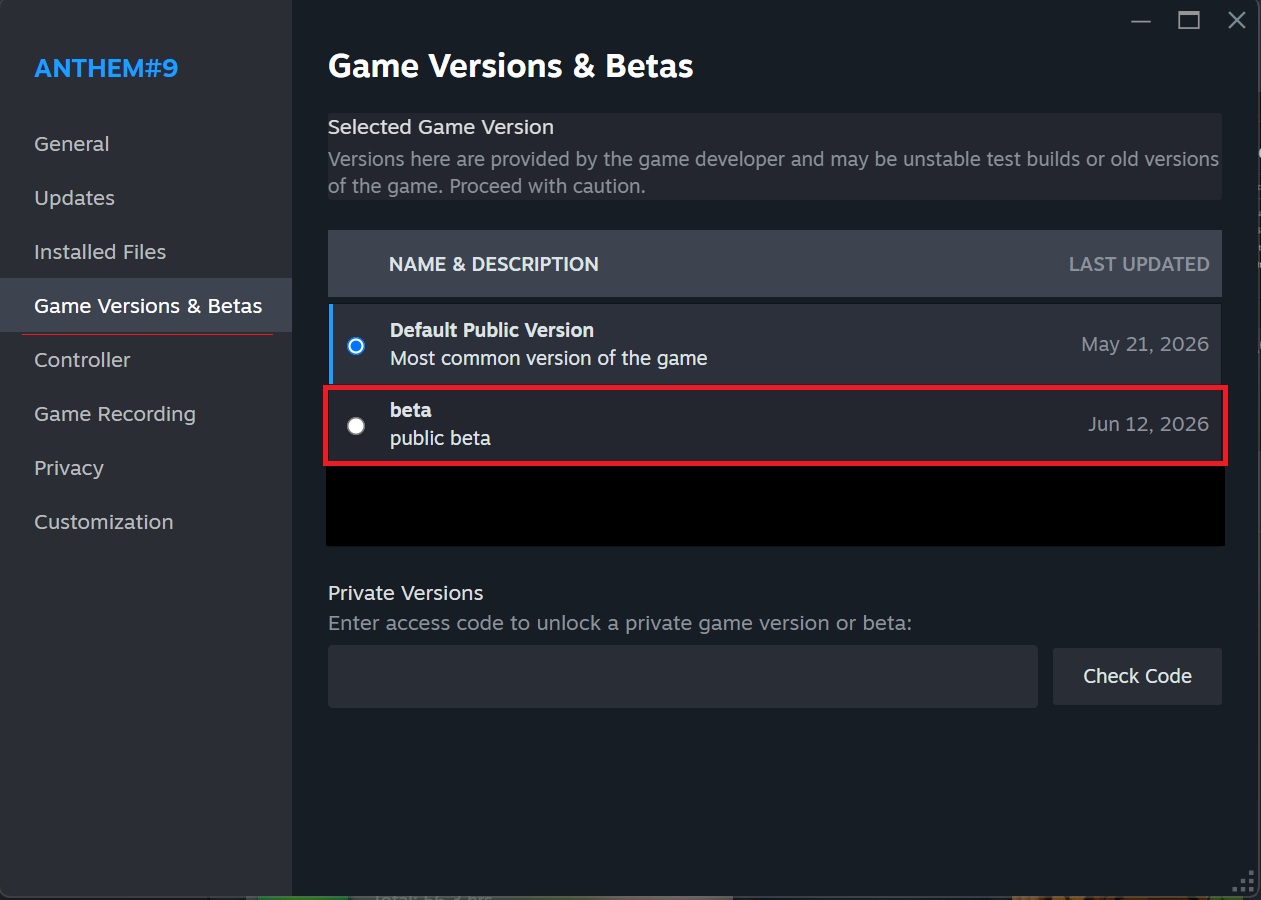
After selecting it, Steam will download the update for the beta branch.
Check That the Switch Is Complete
If VERSION beta is shown near the PLAY button in your Steam Library, the switch is complete.

Return to the Default Public Version
To return to the default public version, select Default Public Version on the same screen.
Steam will then download the data for the default public version. After the download is complete, launch the game as usual.
Notes
- Content on the
betabranch may be changed later or added to the default public version. - Behavior may differ from the default public version.
- When reporting issues, please mention that the issue occurred on the
betabranch if possible.